
“If our rent, mortgage or energy bill goes up, what can we adjust to keep our monthly surplus comfortable?”
What If & Impact Preview
See how a change fits before you commit.
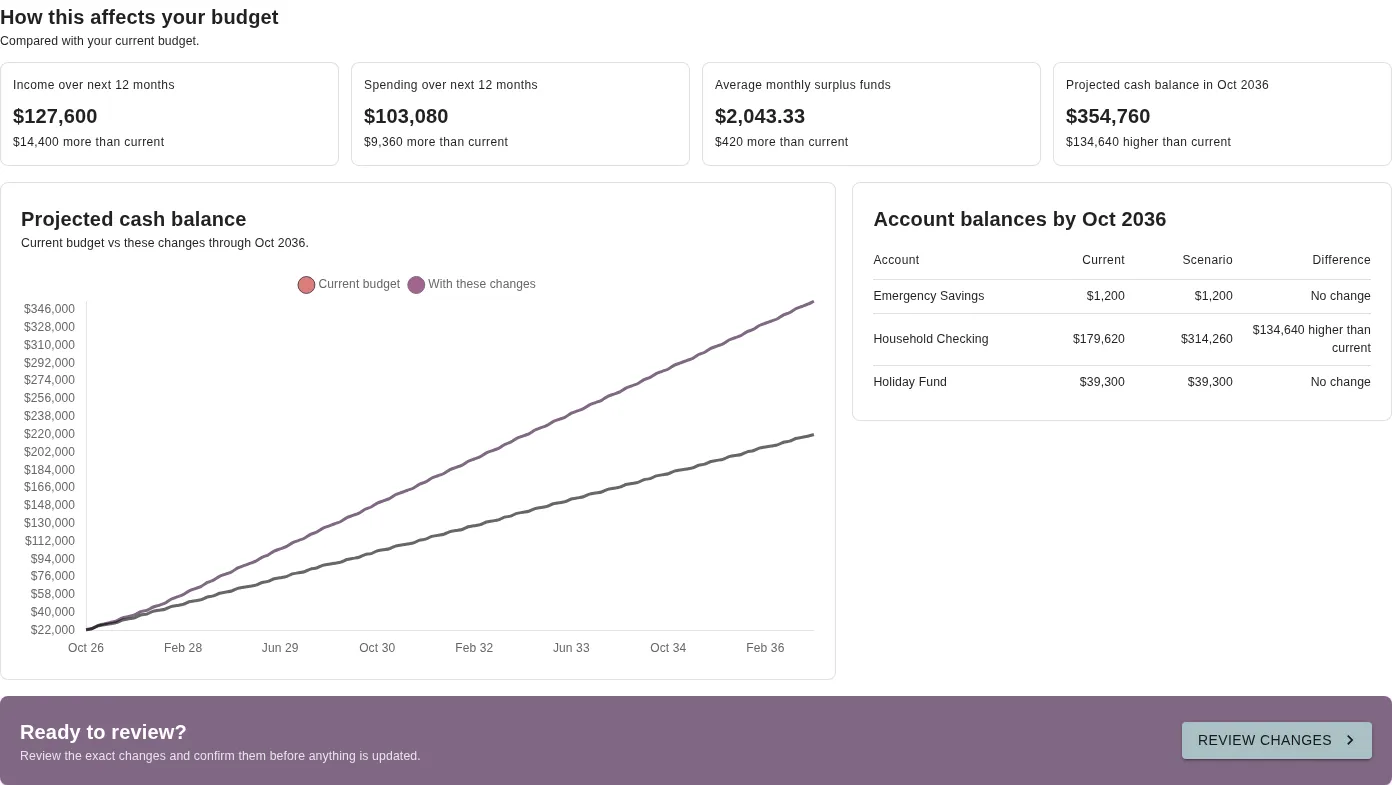
Try out a new expense, a change in income or a new goal against the budget you already have. Preview a single item while you are adding it, or combine multiple changes using our scenario tools to gain absolute confidence in your cash flow and account balances.
How it works
Test changes against your real budget.
Because your pay cycles, bills and goals are already in Budgetezy, you don’t need a separate spreadsheet to work out if you can afford something. Test an idea against your actual schedule and see the result straight away.
Quick check in the form
Adding a new income or regular expense? Instantly project the 12-month impact before making a commitment.
12-month previewCombine multiple changes
When more than one thing is changing, build custom scenarios to securely experiment with new pay cycles, bills, and goals risk-free.
Up to 10 years aheadApply when you’re ready
Try different amounts and dates without changing your saved budget. If the numbers work, review and apply the updates in one step.
Safe to experimentImpact Preview
Check a new income or expense before saving.
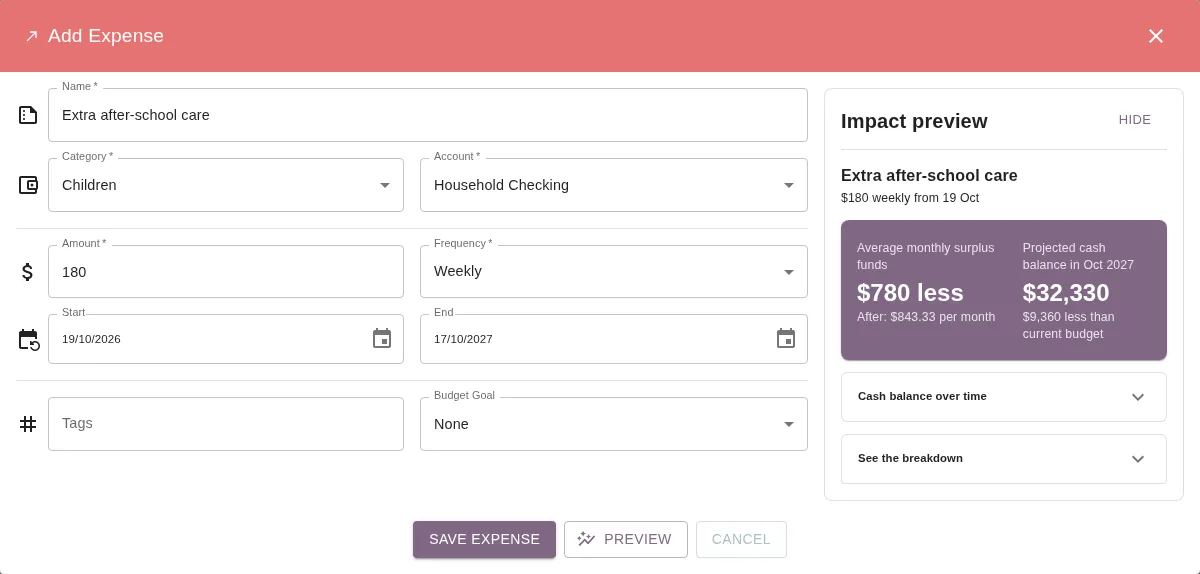
A weekly or monthly cost can look small on its own, then add up once annual bills and busy months are taken into account. Watch exactly how a single new cost shapes your financial year ahead, all before you hit save.
- 01 · Monthly surplus
See how your surplus changes.
Check how the new income or expense affects your average monthly surplus over the next 12 months.
- 02 · Lowest cash balance
Spot tight months early.
Open the breakdown to see your lowest projected cash balance and the date it happens.
- 03 · Edit in place
Adjust the details until it fits.
Try a different amount, start date or account and update the preview before you save.
What If scenarios
Model bigger changes together.
Often you want to test a few things at once, like a change in pay alongside a new bill, or higher living costs paired with a new savings goal. Model complex life changes instantly and watch how your updated income and expenses interact to shape the big picture.
New income or expenses
Add a possible item
Test a new regular bill, a one-off cost or extra income alongside everything already scheduled in your calendar.
Existing budget items
Change or end current items
Try a pay change, a rent or mortgage increase, or reducing a spending category from a future effective date.
Budget Goals
Include a new goal
See how saving for a purchase, growing an account balance or paying off debt fits with your regular bills.
Pay timing
Shift or skip a pay date
Skip a forecast income date or move a payment date to check how your cash buffer handles a delay.
Questions you can test
Built around the decisions you actually make.
What If uses the accounts, schedules and goals already in your budget, so you can test the questions on your mind against your own numbers.
“How would changing jobs, adjusting hours or taking time between contracts affect our cash buffer?”
“How much sooner could we reach a savings target or pay off a debt if we put extra towards it?”
“Can our accounts handle a new weekly or monthly cost without dipping too low in a busy bill month?”
Review and apply
Keep exploring, or apply the changes.
Testing a scenario never changes your live budget. You can compare options across up to ten years, try different numbers, or close the scenario and leave everything as it was.
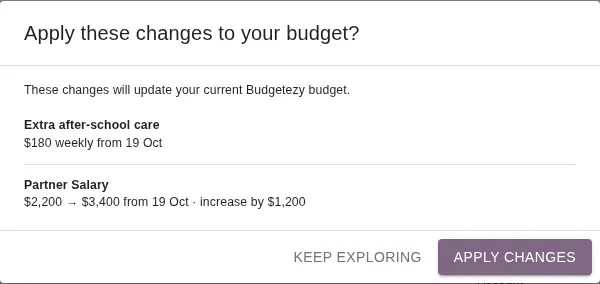
When you want to go ahead, you don’t need to enter the changes again. Confidently apply your tested changes with a single tap to instantly update your active budget.
Your saved budget stays unchanged while you test Check every new or updated item before applying Pay-date timing tests stay in the comparison only and never overwrite your schedule
Help & Guides
Learn more about previews and projections.
Follow the steps for inline Impact Preview and What If scenarios, or explore how Budgetezy calculates your projected cash.
Explore all guidesPreview a budget change before you save it
Use the add-form Preview, combine changes in What If and review before applying.
How projected cash balances are calculated
Understand how planned income and expenses shape your cash outlook.
Keep a possible project item as a draft
Know when to save a project draft and when to use a temporary What If scenario.
Budgetezy Premium · $3 a month
Sign up to Budgetezy today.
See your money move over time and plan for what's next with your calendar, dashboard, what-if planning and Budget Goals in one place. Choose annual billing and get the whole year for $30.
Access Budgetezy on any device through your browser.
Or download the Budgetezy app:


Budgetezy Premium
Premium plan
$3/month
Unlimited accounts and budgets
Keep track of your income and expenses
Plan holidays, projects and other goals
Calendar, dashboard and what-if planning
Or save with annual billing
$30/year