
Grow income compares a target with one income you already plan in Budgetezy. Keeping both amounts on the income's own frequency makes the gap easier to understand: if a fictional fortnightly income is planned at $2,000 and the target is $2,300 fortnightly, the Goal shows $300 below target.
This Goal follows the income's current planned amount. It does not use a single recent payment as its main measure of progress, and it does not create transfers or payment rows.
Create a Grow Your Income Goal
Open Budget → Budget Goals on a larger screen, or three-dot menu → Manage Budget → Budget Goals on a smaller screen.
Choose Add goal, then choose Grow income. Enter a Goal name, then under Income target choose the income in Income to grow. The current amount and its frequency appear for reference. Enter the amount in the frequency-labelled target field, choose Reach it by, then choose Tracking start date.
The income must already exist in Budgetezy. If it is not listed, add or update it first using Plan income in Budgetezy, then return to the Goal.
Keep the target on the income's own frequency
The linked income supplies the frequency for both sides of the comparison. If you link a fortnightly income, Budgetezy labels the target as a fortnightly income target and compares it with the current fortnightly plan. It does not convert one side to monthly or yearly.
Review before creating the Goal
Choose Review plan to check the linked income's current amount, target and dates. When those details are right, choose Create goal. This type tracks a comparison only; unlike Save for something, Grow your balance and Pay off debt, it creates no transfer or payment schedule.
What changes the progress
The linked income remains the source of the current planned amount. If you later change its planned amount, the Goal comparison changes with it. Changing the Goal's target changes only the target; it does not rewrite the underlying income schedule.
Progress can read below target by, target reached or ahead by, based on the current planned amount compared with the target.
Use the last received amount as context
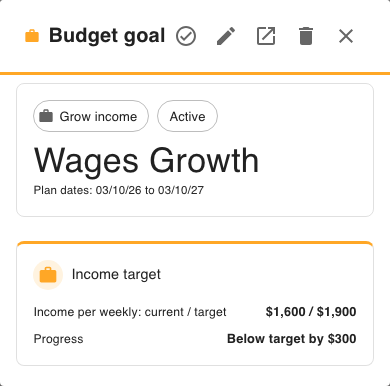
When the linked income has a recorded actual, its details can also show Last received with the amount and date. That is useful context, while the progress comparison remains tied to the current planned amount.
See Plan income in Budgetezy for changing the income plan, or Find and manage your Budget Goals to return to the Goal later.