
A Goal's progress value is meaningful only when you know what it measures. Saved / target counts the starting amount and recorded contributions, for example, while Remaining debt shows a liability balance. Budgetezy uses a different source value for each Goal type instead of treating every Goal as the same percentage.
Use the label beside the value to check whether it describes money already recorded, a current balance, a forecast, or planned allocations. These labels explain stored and calculated values; they do not recommend a target.
Spending Target uses recorded contributions
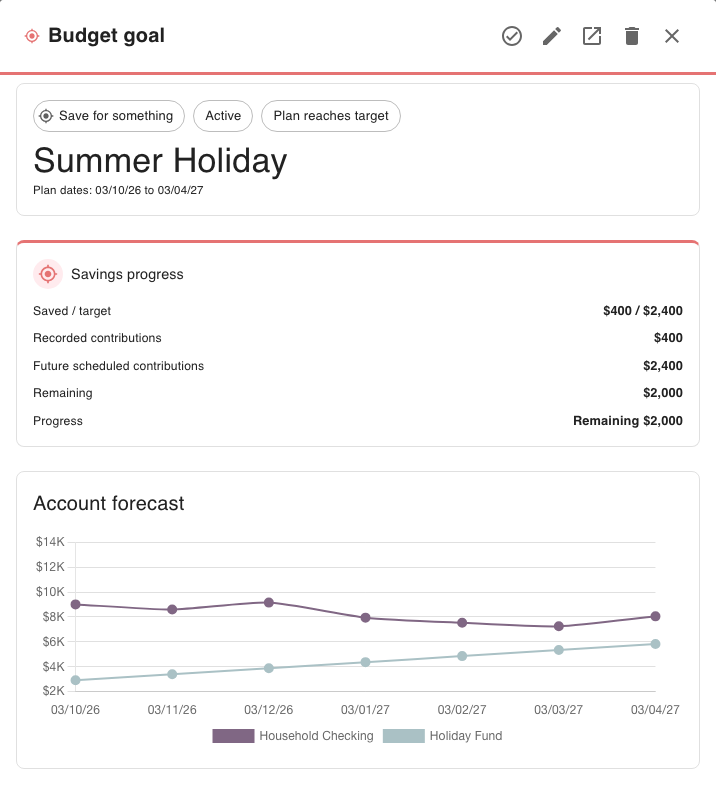
The primary metric is the Already set aside starting amount plus recorded contributions against the target. Future scheduled contributions are separate because they have not happened yet.
The detail view uses Saved / target and may show Remaining, Target reached or Ahead by. For example, if $400 has been recorded toward a $1,000 target, Saved / target is $400 / $1,000 and Remaining is $600. A future $50 contribution does not count as saved until it is recorded.
Grow Your Balance follows the destination account
The primary metric is the balance of the selected destination account. When the Goal has a target date, the detail view uses the forecast balance for that date; without a target date, it uses the current balance.
Labels can include Current balance, Forecast balance, Balance / target or Forecast balance / target. If no target balance is set, Budgetezy shows the balance without inventing a target or percentage. A Dashboard card may shorten Forecast balance / target to Balance / target; the detail view makes the forecast basis clearer.
Pay Off Debt follows the liability balance
The primary progress value is the current balance of the linked liability, shown as Remaining debt. It is not a total of future scheduled payments. The detail view shows the remaining amount or Debt cleared when the liability balance is zero or below.
The estimated payoff date is calculated from the payment schedule and liability details. It is separate from the current-balance progress value and is not a guaranteed outcome.
Grow Your Income compares like with like
The linked income amount is compared with the target on the linked income's frequency, such as per month or per fortnight. The current amount and target therefore use the same time basis.
The detail view can show Below target by, Target reached or Ahead by. For example, $3,000 per month against a $3,500 monthly target is $500 below target per month. The Dashboard card may use the shorter label Income / target.
Plan a Project compares planned allocations with limits
The project Goal compares planned income or spending assigned to the project with its configured limit. It can show Income planned / limit, Spending planned / limit, Remaining, Budget reached or Over budget by.
For example, $8,400 of planned project spending against a $10,000 limit leaves $1,600. This is a planned-allocation measure, not a total of recorded transactions.
Progress and schedule status answer different questions
A Goal with a generated transfer or payment schedule can have both:
- a progress metric describing the tracked value so far; and
- a schedule status describing what the configured future schedule is expected to do.
Schedule labels include No transfers scheduled, Plan reaches target, Plan leaves [amount] remaining and Target reached. For example, a Spending Target can have $400 of recorded contributions while its future schedule is labelled Plan leaves $600 remaining. The first value reports contributions so far; the second describes what the saved future schedule is expected to do.
The schedule label is a calculation from the configured dates and amounts, not a promise that future transfers or payments will occur.