
A Goal is useful when its progress answers the question you care about. Budgetezy offers five types because a purchase target, an account balance, a debt, an income target and a project each need different information and progress measures.
Open the Goal type chooser
On a larger screen, open Budget → Budget Goals. On a smaller screen, open the three-dot menu → Manage Budget, then find Budget Goals. Choose Add goal and the chooser opens with What would you like your money to do? You can also start from Dashboard → Add → Budget Goal.
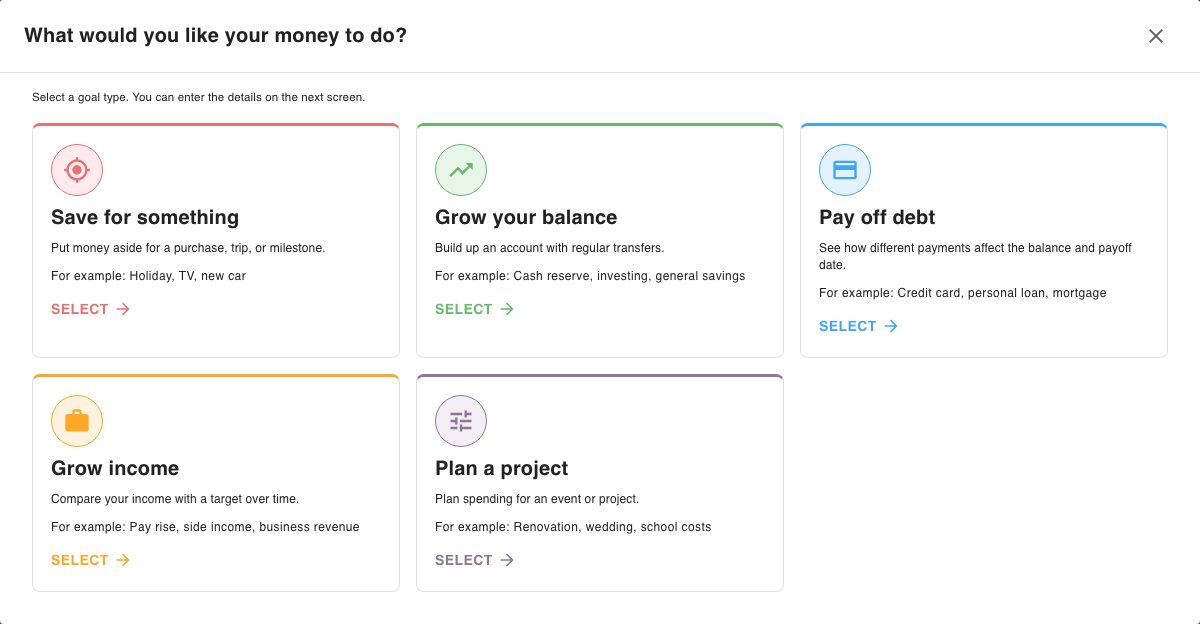
Choose by the result you want to follow
- Save for something (the Spending Target Goal) fits a known amount you want to set aside by a date. It creates a transfer plan into a chosen account and separates recorded contributions from future ones. See Plan a purchase or milestone with a Spending Target.
- Grow your balance fits an account whose balance you want to track as it changes. You can add a target balance and date, or leave the target off and follow a regular fixed contribution plan. See Track an account target with Grow Your Balance.
- Pay off debt fits a debt with a saved balance and interest rate when you want to compare them with a planned payment schedule and estimated payoff date. See Track a debt balance and planned payments with Pay Off Debt.
- Grow income fits one existing planned income that you want to compare with a target on the same frequency. It follows changes to that income's planned amount and does not make a transfer schedule. See Track an income target with Grow Your Income.
- Plan a project fits an event where you want its active planned income and expenses grouped against separate project limits. It does not create a contribution schedule. See Keep planned income and expenses for an event or project together.
Example: two ways to plan the same trip
For a fictional Weekend Away, use Plan a project to group the cabin booking with other trip items and compare them with a spending limit. If your question is instead how transfers build one account toward a target amount by a date, choose Save for something. A project limit follows active trip items; a Spending Target follows a transfer plan into one account.
After creating a Goal, return to Find and manage your Budget Goals to reopen it or find it under Completed Goals or Archived goals.