
A budget needs to keep the expectation and the result visible. A planned value describes a saved income or expense schedule; an actual records what happened for one occurrence. Budgetezy connects the two so a different amount or date can be recorded without silently rewriting the future schedule.
Planned values are the expectation
A planned item carries the expected amount and date plus its account, category and schedule context.
For a repeating item, one saved schedule can generate many future planned occurrences.
That makes the plan useful before any transaction has happened.
Recorded values are attached to one occurrence
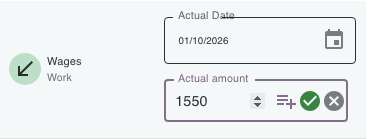
When you use Record Actual, Budgetezy stores the amount and date against the planned occurrence you selected. For example, a grocery expense planned as $180 on 7 October could be recorded as two purchases: $120 on 8 October and $74.50 on 10 October. The occurrence still has its $180 plan; its recorded total is $194.50.
Why Budgetezy does not simply replace the plan
If recording $194.50 replaced the $180 forecast everywhere, you would lose the ability to compare expectation with result. Keeping the planned occurrence attached lets you ask two different questions:
- what was expected for this occurrence?
- what was actually recorded?
An actual does not become the next recurrence rule
Suppose a monthly bill is planned for the 10th at $120.
In November it is paid on the 12th for $127.
Recording that actual does not automatically change December to the 12th or $127. The recurrence still comes from the saved bill schedule.
If $127 on the 12th becomes the new ongoing expectation, edit the underlying plan separately.
One plan can have several actual items
Some expense occurrences can be split into multiple actual items. Each item keeps its own amount, date and optional description while remaining associated with the same planned occurrence. In the example above, the two grocery purchases are actual items for one planned $180 occurrence.
Which side should you edit?
Use this shortcut:
- future expectation changed → edit the plan;
- recorded result is wrong → edit the actual.
After an actual is recorded, Budgetezy locks that item's Start, Frequency and Account so the source of the recorded event stays identifiable. To change a recurring amount, change Amount, then use the calendar icon in the Amount field to set when the new amount begins. The Effective from text confirms the date. To correct what happened for one occurrence, edit its actual instead.
See Record what actually happened for the workflow, or Change something you've already planned when the future plan itself changed.