
Save a regular income or expense once and Budgetezy generates its planned Calendar occurrences. A fortnightly payment, monthly bill or yearly charge can therefore appear across the plan without you creating every date separately.
An actual belongs to one generated occurrence. If it happens early, late or for a different amount, recording it does not silently change the next occurrence.
Standard frequencies
Income and ordinary expense items can use:
- Once Off;
- Weekly;
- Fortnightly;
- Monthly;
- Quarterly;
- Yearly; or
- Custom.
Once Off creates one planned occurrence using the start date.
A repeating frequency generates future occurrences from the saved Start date according to its cadence.
Start and end dates give the schedule its boundary
The Start date anchors the schedule. A repeating item can also have an End date. An occurrence on the End date is included; later occurrences are stopped.
For example, one $2,000 fortnightly income starting 2 October represents the repeated paydays from that date. If it has an End date, Budgetezy includes a payday scheduled exactly on that date.
Custom schedules cover less common patterns
Choose Custom in Frequency, then choose a unit in Repeat Every and enter the number in Interval. For example, an interval of 3 with Weeks means every three weeks. Available units are Days, Weeks, Months and Years. The custom interval still follows the item's Start date and optional End date.
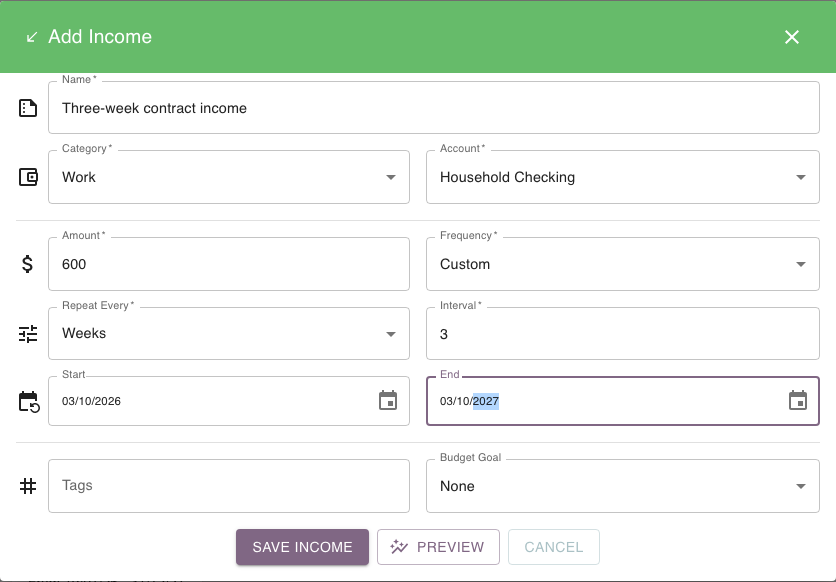
The calendar is generated from the saved schedule
The Calendar is generated from the saved schedule, so changing that schedule can change future occurrences. Recording one actual only changes what happened for that occurrence; the next date still follows the saved cadence.
Example: one late payment does not move the schedule
A service payment is planned every three weeks from 1 October. If one payment arrives two days late, record its actual against that occurrence. The next planned payment still follows the saved three-week pattern from the original Start date.
If the service has genuinely moved to a different ongoing cadence, edit the underlying plan instead.
Budget Goal schedules are intentionally narrower
Generated Budget Goal transfer or payment schedules offer a smaller set of frequencies:
- Weekly;
- Fortnightly;
- Monthly;
- Quarterly; and
- Yearly.
Once Off and Custom are not offered for these Goal schedules, even though ordinary income and expenses support them.
See Planned vs recorded amounts for why occurrence-specific actuals stay separate from the recurrence.